
Table of Contents
THE RESULT AT A GLANCE
radiologie³ is a radiology practice group with six sites and around 15 employees. Since 2023, the group has managed the radiology shift schedule for all six sites in Planerio, including annual leave and teleradiology assignments. Employees record their working hours via browser and app, without terminals. Compared to the previous Excel planning, the group says it saves up to 90% effort.
Key Figures
Radiology shift schedule: one pool for six sites

radiologie³ is a radiology practice group with six sites, five in North Rhine-Westphalia and one in Hesse. One to two physicians work at each site. The equipment is provided by an external service provider, while the group employs the staff itself. The roughly 15 employees have fixed sites, but belong to a shared pool and cover for each other—across distances that cannot be bridged quickly. Shift planning for medical practices that ends at the individual site is therefore not sufficient for the group.
Profile
- Industry
- healthcare
- Use case
- Radiology, practice group
- Company size
- small (up to 50 employees)
- Employees and sites
- around 15 employees, 6 sites
- Features used
- digital shift planning, time tracking, employee scheduling app
- Integrations
- none
- Customer since
- 2023
- Region
- North Rhine-Westphalia and Hesse
“We needed a tool that enables time tracking via the browser, is legally secure in terms of data protection, and is still designed to be so simple for employees that it does not create a lot of effort.”

The challenge
Initially, the group planned manually in Excel and Google Sheets. With six sites and a shared pool, this reached its limits: planning took time, and the follow-up checks took even more. An initial shift planning tool did not help. Creating schedules there was cumbersome, and the team was reluctant to use it. So the group started looking again.
The biggest challenges:
- Spreadsheets without a change history. In Excel and Google Sheets, no one could see who changed what and when.
- Time tracking without hardware. Six sites needed to record working hours without having a terminal everywhere.
- One pool across long distances. Employees cover across sites, and one site is in another federal state.
- Double assignments in teleradiology. One person works at their own site and simultaneously supports another practice remotely.
“If you have a file that can be manipulated, then it becomes difficult from a purely legal perspective.”
Dr. med. Dominik Maas · Practice owner · radiologie³
The solution
Six sites, one plan. The connection to Planerio came through exchanges among radiologists. The fact that a radiologist co-founded Planerio was the door opener for the group. What ultimately made the difference were the shift schedule models, which were easier to set up, and a clear interface. Today, the group plans all six sites in digital shift planning, with leave planning running well in advance. One person prepares the schedule, and two other employees approve it and fine-tune it.
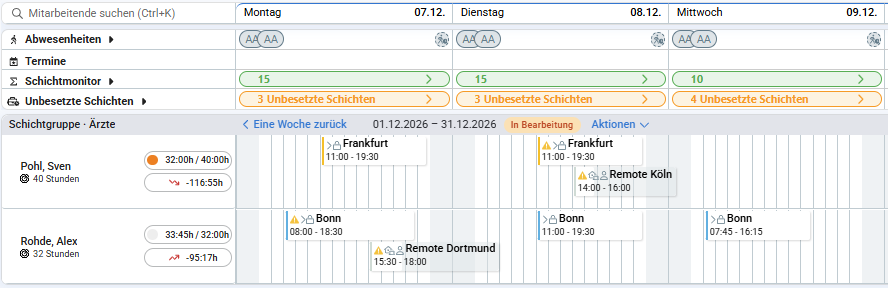
One shift, two sites. For teleradiology, the group created dedicated remote sites. Anyone supporting another practice remotely from their own site appears in both shift schedules. Planerio flags the overlap as a conflict, but still allows it. In the employee scheduling app, the person sees both entries: the on-site shift and the remote assignment with time.
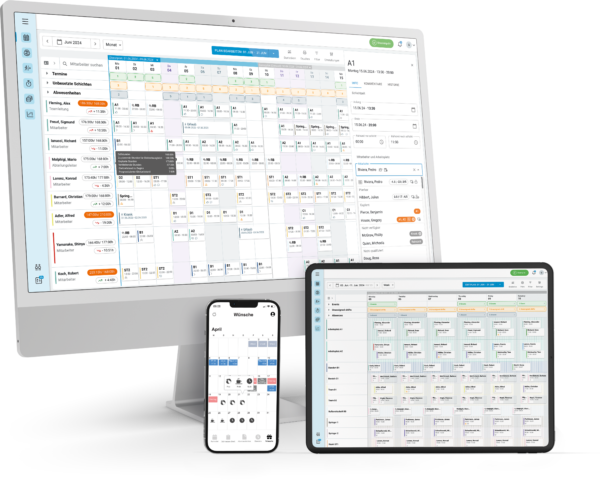
Time tracking without a terminal. Employees record their working hours via browser and app; the group does not need terminals. App usage is intentionally kept tight so that sign-in takes place on site. For employees, time tracking consists of two steps: sign in and clock in/out. They can view their time account balance and shift schedule at any time.
Radiology shift schedule: set up independently in two to three weeks
Originally, the Planerio team was supposed to handle part of the setup. However, Dr. Maas found his way around so quickly that he completed it himself alongside day-to-day practice operations. He got up to speed via the knowledge base, and two video calls clarified open points. Many settings were already preconfigured by Planerio. “You really get excellent guidance,” says Dr. Maas, “and you have to say it: we doctors are laypeople when it comes to employment law and HR administration.”
Within the team, it was even faster. One or two employees already knew Planerio from larger practices; for everyone else, a brief introduction in a small group was sufficient. In less than a week, everyone was working with the shift schedule overview and time tracking. In Dr. Maas’s assessment, acceptance within the team is significantly higher than with the first tool.
Implementation in three stages
| 01 Selection | 2023 | Switched from the first shift planning tool; reviewed one or two additional providers |
| 02 Self-setup | 2–3 weeks | Onboarding via the knowledge base, plus two video calls with the Planerio team |
| 03 Team on schedule | 2–3 weeks | Brief introduction in a small group: login, shift schedule overview, clocking in/out |
“If someone knows how to use a browser, they can basically use Planerio.”
Dr. med. Dominik Maas · Practice owner · radiologie³
The result
Dr. Maas sees the big leap in efficiency with Planerio compared to Excel: “Compared to the standard Excel spreadsheet, it’s worlds apart.” Compared to the first shift planning tool, the group estimates it saves at least 30%. A large part of that was follow-up checking work that also arose with manual planning. All six sites and teleradiology are now in one shift schedule. Planerio logs every change, making it traceable. And the team was working independently with the system in less than a week.
| BEFORE | AFTER |
| Shift schedule and time tracking in Excel and Google Sheets | Shift schedule, leave planning and time tracking in one system |
| Changes in the spreadsheet without a history | Planerio logs every change |
| No easy time tracking for six sites | Clocking in/out via browser and app, without terminals |
What Planerio did not solve
Software cannot replace discipline when clocking in/out. For one or two employees, the group still has to regularly remind them to clock in and clock out. And the setup remained an in-house effort: anyone who sets it up themselves like Dr. Maas invests time alongside day-to-day practice operations. For a practice without an IT department, this needs to be realistically planned for.
GDPR-compliant · servers located in Germany · Proven
Legal compliance in day-to-day operations
Since the European Court of Justice ruling of 2019-05-14 (C-55/18) and the Federal Labour Court decision of 2022-09-13 (1 ABR 22/21), employers must systematically record their employees’ working time. For radiologie³, this was one reason for the switch: a spreadsheet that anyone can change without it being visible is hardly suitable as evidence. Today, employees record their times themselves via browser and app, and Planerio logs changes to the shift schedule. The employment-law assessment of the shift schedule and working hours remains the responsibility of the practice.
This article reflects the legal situation as of November 2026 and does not replace legal advice.
Outlook
Implementation is complete, and the shift schedule is running in day-to-day practice operations. In the meantime, employees from the team create the schedule. Their first point of contact for questions is the knowledge base. In principle, the group does not want to change anything: shift schedule, leave planning and time tracking run for all six sites in one system.
THE MOST IMPORTANT POINTS AT A GLANCE
- Starting point: Shift schedule and time tracking in Excel and Google Sheets; an initial shift planning tool was not convincing.
- Used: digital shift planning, time tracking and employee scheduling app, without terminals and without integrations.
- Result: six sites and teleradiology in one plan; changes are traceable.
- Implementation: set up independently in two to three weeks; the team was ready to go in less than a week.
- Limitation: reminders to clock in and clock out are still necessary for individual employees.
Shift planning for multiple practice sites in one system
Proven: Over 4,000 sites in the DACH region manage their shift planning with Planerio.