

In this post, we explain what a shift pattern is, what benefits it offers, and how it can be easily implemented with shift sequences in Planerio.
Create more stable and simpler shift plans with recurring shift patterns
Imagine not rebuilding your shift plan from scratch every week—instead, you have a stable framework that repeats automatically and is only adjusted when needed. That is exactly what shift patterns are: a proven concept for companies with shift work that reduces planning stress, creates fairness, and makes employees more satisfied.
What is a shift pattern, really?
Shift patterns (also called a framework plan, pattern plan, or rotation plan) are a recurring base plan for shifts over a fixed cycle. They define which shifts run when, how they rotate, and who covers the shifts.
A simple example: In week 1, early shift for Team A, late shift for Team B. In week 2, the other way around. The plan repeats seamlessly. Shift schedulers only add deviations such as annual leave, sickness, or peak periods.
The key: Structure replaces chaos. Detailed planning stays flexible, but the framework remains stable.
The 5 biggest benefits of shift patterns – why the effort is worth it
Shift patterns are not a gimmick, but a game-changer for creating shift planning. Here are the top benefits, backed by real-world examples from our customers:

More predictability for employees
Reliable blocks of time off over weeks—ideal for family, hobbies, or commuting. Less stress from last-minute changes, higher satisfaction and retention.

Significant time savings in planning
Set it up once, then just maintain it. Significantly less effort, fewer coordination and correction loops.

Fairness and fewer conflicts
Clear rules for nights, weekends, or rotations. Strenuous shifts are distributed evenly—conflicts are resolved systematically, not ad hoc.

Better compliance
Rest time, ArbZG, and minimum staffing are built in proactively. Fewer errors, penalties, or rework.

More stable processes and efficiency
Teams know early who will be there and when. Better handovers, capacity planning, and cost control—> minimized overtime.
How to implement shift patterns: shift sequences in Planerio
Theory is good, practice is better. Planerio makes shift patterns easy: with shift sequences—a feature for continuous, recurring shift patterns that are assigned directly to employees.
Typical use case:
An employee is to work in a fixed 8-day rhythm—three days early shift, then three days late shift, then two days off—and this rhythm repeats continuously, regardless of weekends, public holidays, or absences.
Planerio features: When to use shift sequences and when to use flexible templates?
Planerio offers two features for recurring shift patterns: shift sequences and flexible shift templates. Here is a comparison table to help you choose the right option:
| Requirement | Flexible shift templates | Shift sequences |
|---|---|---|
| Flexible assignment (any qualified person) | ||
| Fixed assignment (specific person) | ||
| Fixed rhythm without calendar breaks | ||
| Days off included in the pattern | ||
| Weekly cycles/public holiday logic | ||
| Advanced options (priorities, compensation times) |
Use flexible shift templates in Planerio when:
- Flexible employee assignment is required: The shift should be covered by different qualified employees.
- Advanced configuration options are needed: e.g., compensation times, preferred employees, unit tags, shift priority
- Weekly cycles are relevant: The shift should only be generated in certain weeks (e.g., every other week).
- Public holidays should be taken into account: The shift should be handled differently on public holidays.
- Validity periods should be flexible: The shift is only needed for a specific period.
Use Planerio shift sequences when:
- A fixed, recurring rhythm is required: The employee works in a defined pattern that repeats without interruption.
- Employees are assigned permanently: It is clear which employee should work when and where.
- The shift sequence runs independently of calendar events: Weekends, public holidays, or year-end do not interrupt the rhythm.
- Days off are part of the rhythm: Days off are defined as part of the shift sequence and are not treated as exceptions.
- Simple configuration is preferred: Fewer options, but faster setup
Tip: Combine them! Shift sequences for the core framework, templates for flexibility with cover or peaks. This turns “building a plan” into “maintaining a plan”.
Shift pattern examples from practice
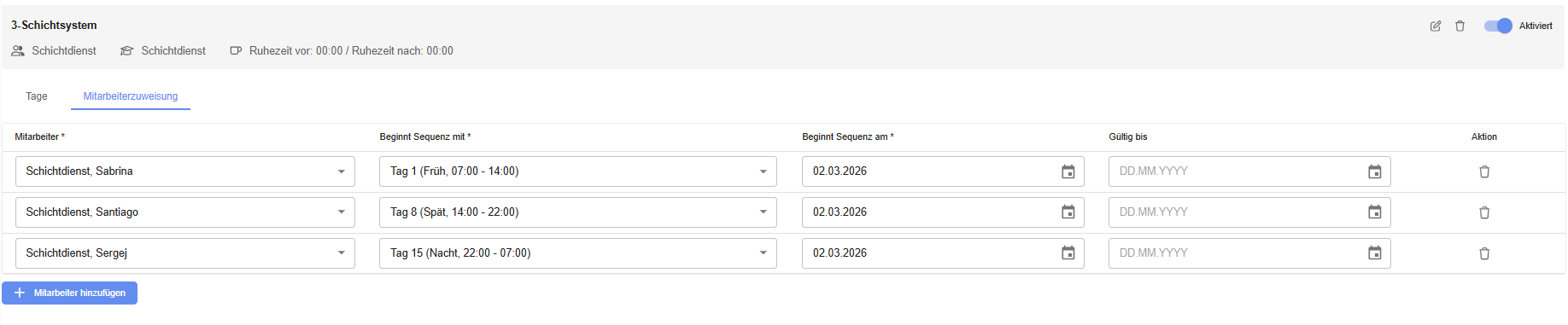
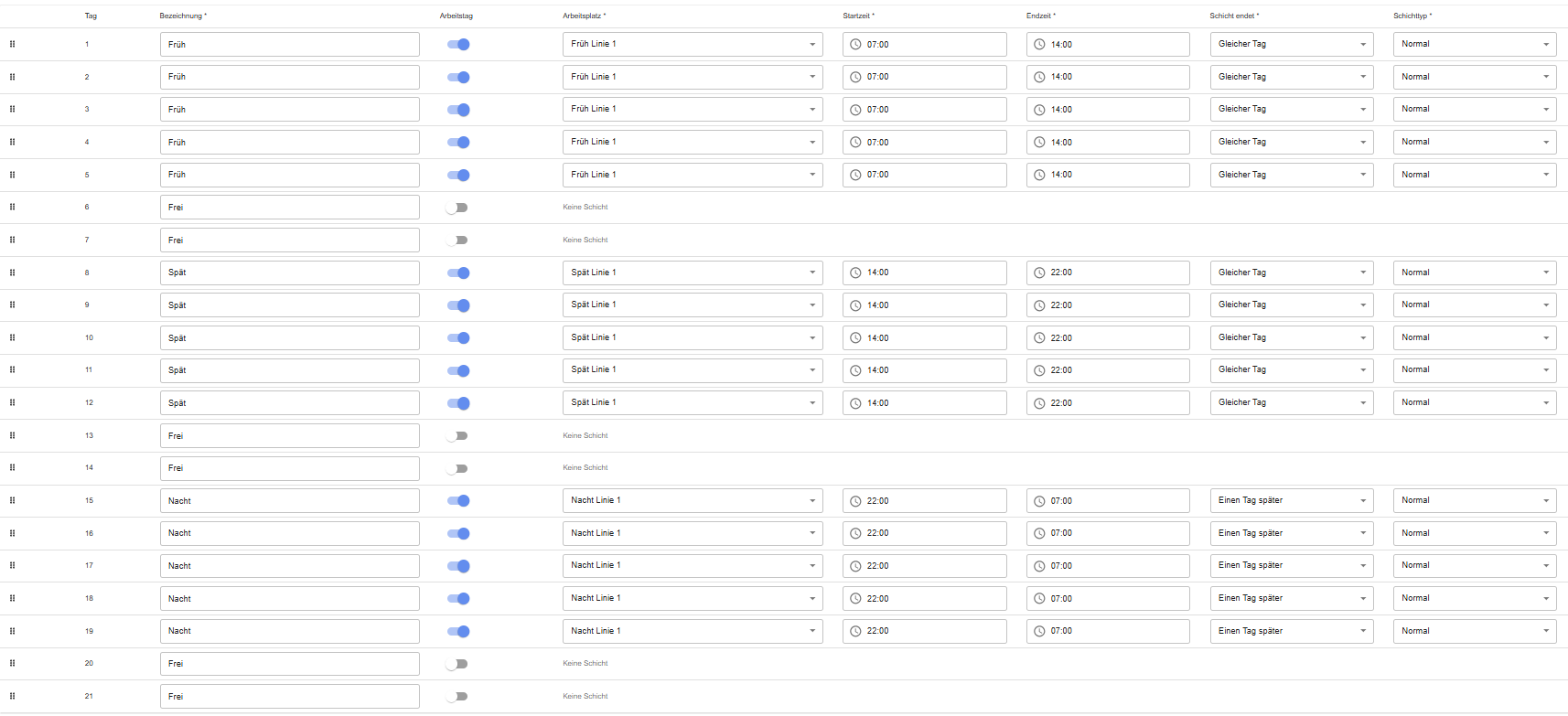
3-shift system (5-day week)
Split into early shift → late shift → night shift → off.
Benefit: Short sequences reduce strain on the team.
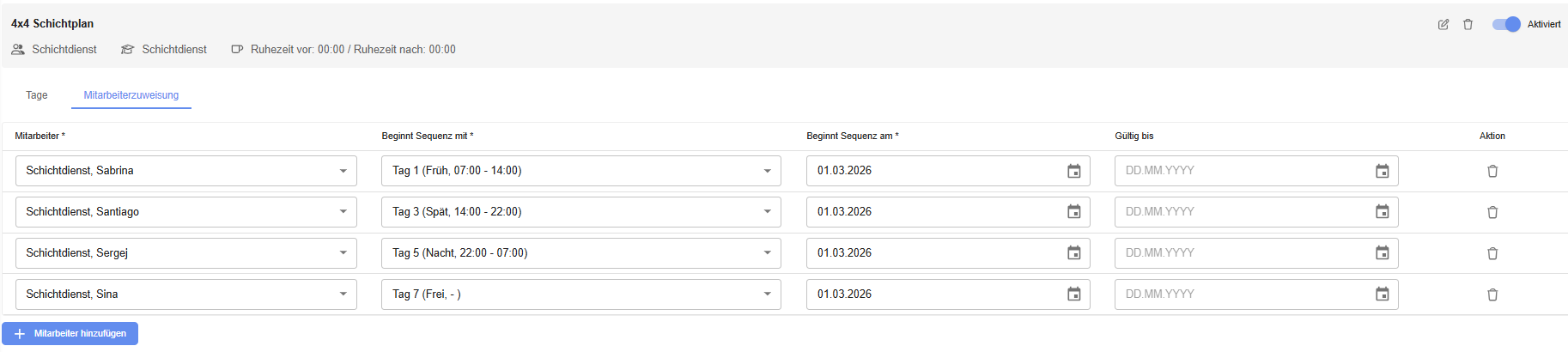
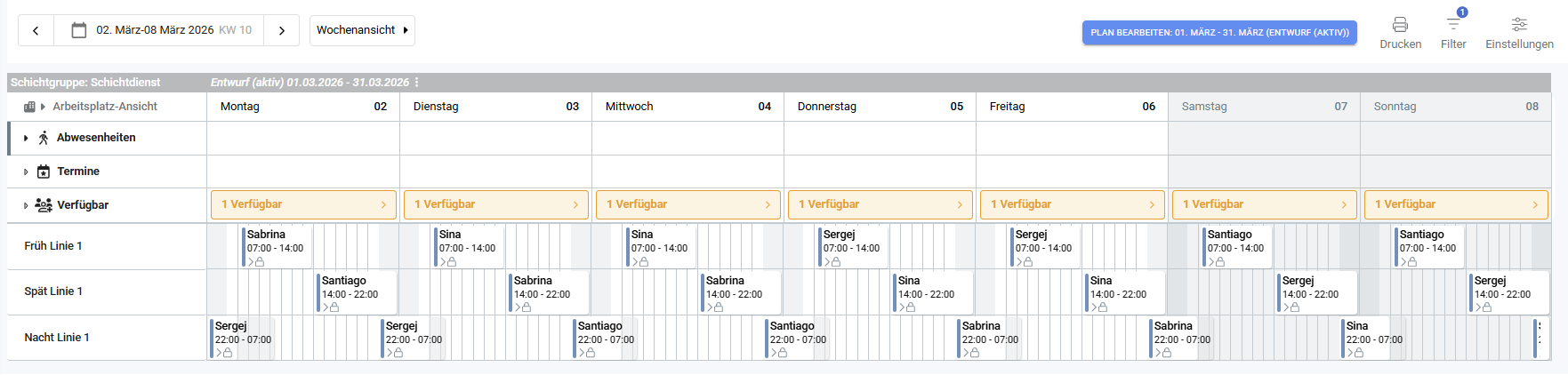
4×4 shift model
4 days on (e.g., 2 day shifts → 2 night shifts) → 4 days off.
Ideal for 24/7 teams with long recovery periods.
How do I create a shift sequence in Planerio, specifically?
In the Planerio shift menu, click “Create” to set up a new shift sequence for your shift pattern. A dialog opens with the following settings:
- Label
Name to identify the shift sequence
- Shift group
Assigns the shift sequence to a shift group
- Qualifications
a. Defines which qualifications are required for the shifts in this shift sequence
b. Only qualifications from the selected shift group can be selected
c. One or more qualifications can be selected - Rest time before / rest time after
Defines a period before or after a shift during which scheduled employees must not be scheduled for any other shift
After saving, the shift sequence is created and enabled by default. You will be automatically taken to the detail view of the new shift sequence.
Contact us for a demo.
Your planning deserves better!
Shift patterns transform your shift planning from tedious to manageable—fairer, more efficient, and future-ready.